I opened the SQLite docs to check one sentence in a piece I was writing, the one saying your data is safe if the power dies, and the docs said it depends on a setting. Writers sync the WAL on every commit only when PRAGMA synchronous is FULL, and they skip that sync when it’s NORMAL. The documented cost of skipping it is that transactions are no longer durable and might roll back after a power failure or hard reset. “Safe if the power dies” isn’t unconditional. It depends on that setting.
That sentence was only the first one that didn’t hold up. The core idea survives: plenty of side projects reach for Redis long before they need it, and a local SQLite file in WAL mode handles more than people expect. But the usual comparison is lopsided, so I went through the claims one by one.
The matchup is slightly rigged #
SQLite is a database. Redis is a data structure server that people use as a cache. The fight most teams actually have is “SQLite inside my app process” against “a network database plus Redis in front of it.” That’s the version worth comparing, and it’s the one I’m answering.
What WAL mode does #
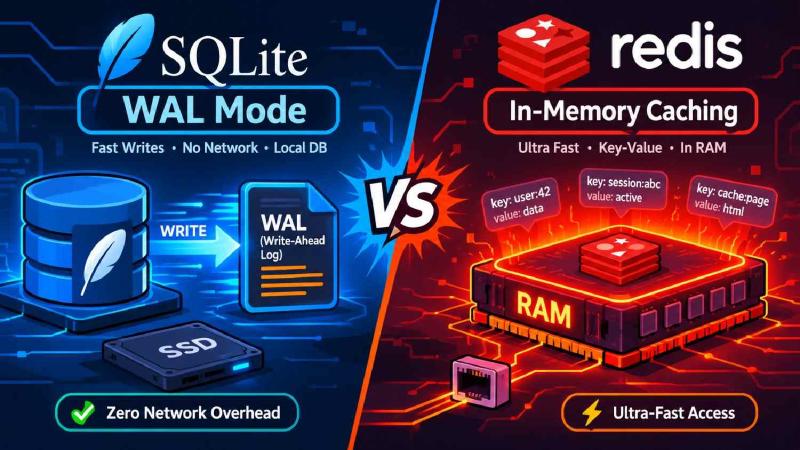
In WAL mode, the original content stays in the database file, changes are appended to a separate WAL file, and a COMMIT is a special record appended to it. Appending to a log is cheap and sequential, which is why writes get faster. That’s the whole trick.
It’s tempting to say readers “access the last committed frame.” That’s close but not right. When a read starts, it remembers the location of the last valid commit record, called the end mark. That end mark stays fixed for the whole transaction, so a read only sees the database as it existed at one point in time. Readers get a snapshot, not a live view. Mostly you’ll never notice, but if you hold a read transaction open for a while, you’re reading old data.
Readers don’t block writers and a writer doesn’t block readers. Here’s the catch: there’s only one WAL file, so there can only be one writer at a time. That single-writer limit is the real ceiling, and it belongs in the “when to switch” conversation. WAL doesn’t make SQLITE_BUSY disappear either, since the docs have a section on queries still returning it in WAL mode. Set a busy timeout so a waiting writer retries instead of failing instantly.
Then there’s checkpointing. The WAL has to be copied back into the main file eventually. By default that happens automatically when the WAL reaches 1000 pages. Why you care: read performance falls off as the WAL file grows, and a long-running read transaction can stop the checkpointer from making progress. One forgotten open transaction and the WAL keeps growing while every read gets a little slower.
The last limit decides a lot of deployments. All processes using the database must be on the same host, and WAL doesn’t work over a network filesystem, because they share memory. If you plan to run two app servers behind a load balancer and point both at one SQLite file, stop. That’s not a configuration problem. It can’t work.
Two operational notes follow from how this works. Backing up means more than copying one file, because recent changes may still sit in the WAL and not in the main database. Use SQLite’s backup mechanism. And hot reads aren’t free: they skip the network, but they still run through SQLite’s parser, planner and B-tree code. They’re fast. They’re not a hash lookup.
What Redis does #
Redis keeps its data in RAM and serves it over a socket, either TCP or a Unix domain socket, with serialization on both sides. It’s often called single-threaded, and that needs a fix. Since Redis 6, network I/O can use multiple threads, while command execution stays single-threaded. The consequence hasn’t changed: commands run one at a time, so a slow command holds up everyone behind it.
The latency claim runs backwards #
The usual claim is that Redis edges out SQLite on key-value retrieval because it skips the SQL parser. But Redis costs a network round trip, and an in-process read doesn’t pay that. For a single lookup the embedded database often wins.
I don’t have a benchmark I’d stand behind on your hardware, so I’m not giving you a number. Figures like “tens of thousands of reads per second, sub-millisecond” float around with no source, and the real answer depends on your queries, your indexes and your disk. The one data point I found is a library author’s own test. A project that wraps SQLite in a Redis-style API reports single operations beating Redis over loopback by a wide margin, while Redis wins on concurrent writes and tail latency. That fits the architecture, and it’s still one author’s tests. Measure your own workload.
Redis durability is messier than people say #
It’s easy to say Redis is volatile by default and a restart wipes everything. The truth is messier. Redis has two persistence mechanisms, and the default behavior depends on how you run it. The official Docker image uses a built-in snapshot schedule and writes dump files to disk unless you turn it off. Snapshots only help you up to the last one, and one source notes that a quiet instance on the shipped defaults may snapshot only once an hour, so it can lose an hour of writes.
The append-only file closes most of that gap. With the default appendfsync everysec policy, you can lose between one and two seconds of writes, though on average it’s closer to one. With always, a write is flushed to disk before the client is told it succeeded, which costs you speed. If you’re running Redis purely as a cache, the typical setup is the opposite: an allkeys-lru eviction policy and persistence disabled. Losing a cache on restart is fine. That’s what a cache is.
Operations: SQLite still wins on simplicity #
SQLite is a library in your process. No daemon to monitor, no replication lag, no network partitions. Redis brings memory limits, eviction policies, persistence settings and a process that can crash or run out of RAM. For one small server, that overhead is the actual cost of Redis, more than the latency.
When to stay on SQLite #
Stay on SQLite when you run on a single host, your working set fits in memory, and you want transactions and joins without a sync job between a database and a cache. If your traffic is mostly reads, the single-writer limit rarely bites. Keep transactions short, set the busy timeout, and keep an eye on the WAL size.
When Redis earns its place #
Reach for Redis when state has to be shared across more than one app server: sessions, rate-limit counters, distributed locks. SQLite can’t do that, as covered above. Reach for it when you want real data structures like sorted sets for leaderboards, pub/sub, or bitmaps.
One more thing, because it gets repeated: Redis does not fit when your dataset vastly exceeds RAM. Redis lives in RAM, so a bigger dataset means eviction, and you end up with a bounded cache of hot data in front of something slower. That’s the right job for it when the source of truth is a remote database. It’s a much weaker pitch when the source of truth is a local file your app already reads from memory.
The part I’d print on a mug #
A single SQLite file will take you further than most people think. The day it stops, it won’t be the read path that tells you. It’ll be the writer queue.